For HR Admins
Government reports
Export the monthly SSS, PhilHealth and Pag-IBIG lists, apply year-end tax adjustments and print BIR 2316 forms.
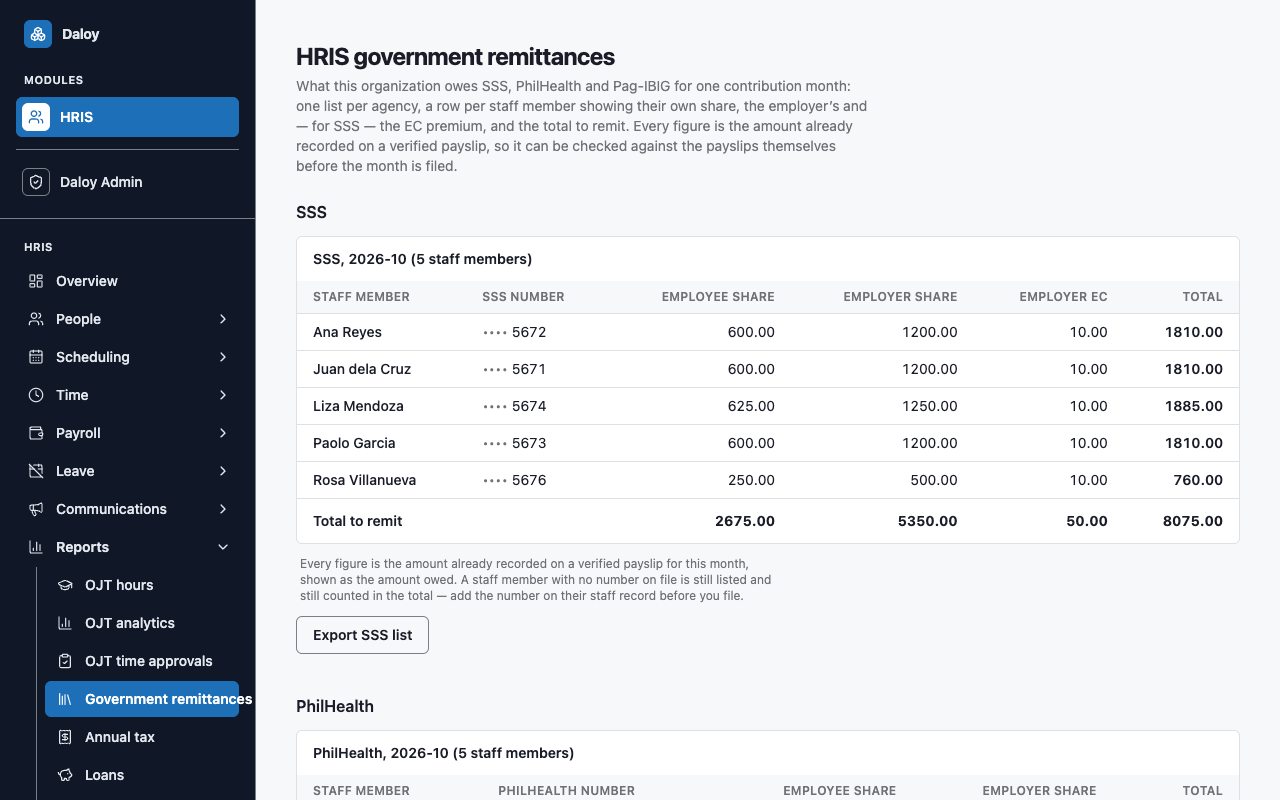
Export a monthly remittance list
- In the side menu, open Compliance › Government remittances.
- Under "Show the contribution month", choose the month and click "Show this month".
- Click "Export SSS list", "Export PhilHealth list" or "Export Pag-IBIG list".
- Choose the "File layout".
- Click "Export list" to confirm. The file downloads to your computer.
- For now the only layout is "Generic list (CSV)". Each agency’s own upload layout is not available yet, so copy the figures into the agency’s form or portal yourself.
- Exports show full ID numbers, so each one is recorded.
Apply a year-end tax adjustment
- Open Compliance › Annual tax.
- Under "Show the tax year", choose the year and click "Show this year".
- On the staff member’s row, click "Apply year-end adjustment".
- Choose the "December pay period" and add a note.
- Click "Apply adjustment" to confirm.
- If you change your mind, click "Remove adjustment".
Print a BIR 2316
- On the Annual tax screen, click "BIR 2316" on the staff member’s row.
- Click "Print 2316".
- Click "Print with full TIN" to confirm, then print from the window that opens.
- If the staff member has no TIN on file, the button reads "Print without TIN". Add the TIN on their record first if you can.
Export the alphalist
- On the Annual tax screen, click "Export alphalist".
- Click "Export file" to confirm.