For HR Admins
Loans
Set up company loan types, decide loan applications and keep track of government loans.
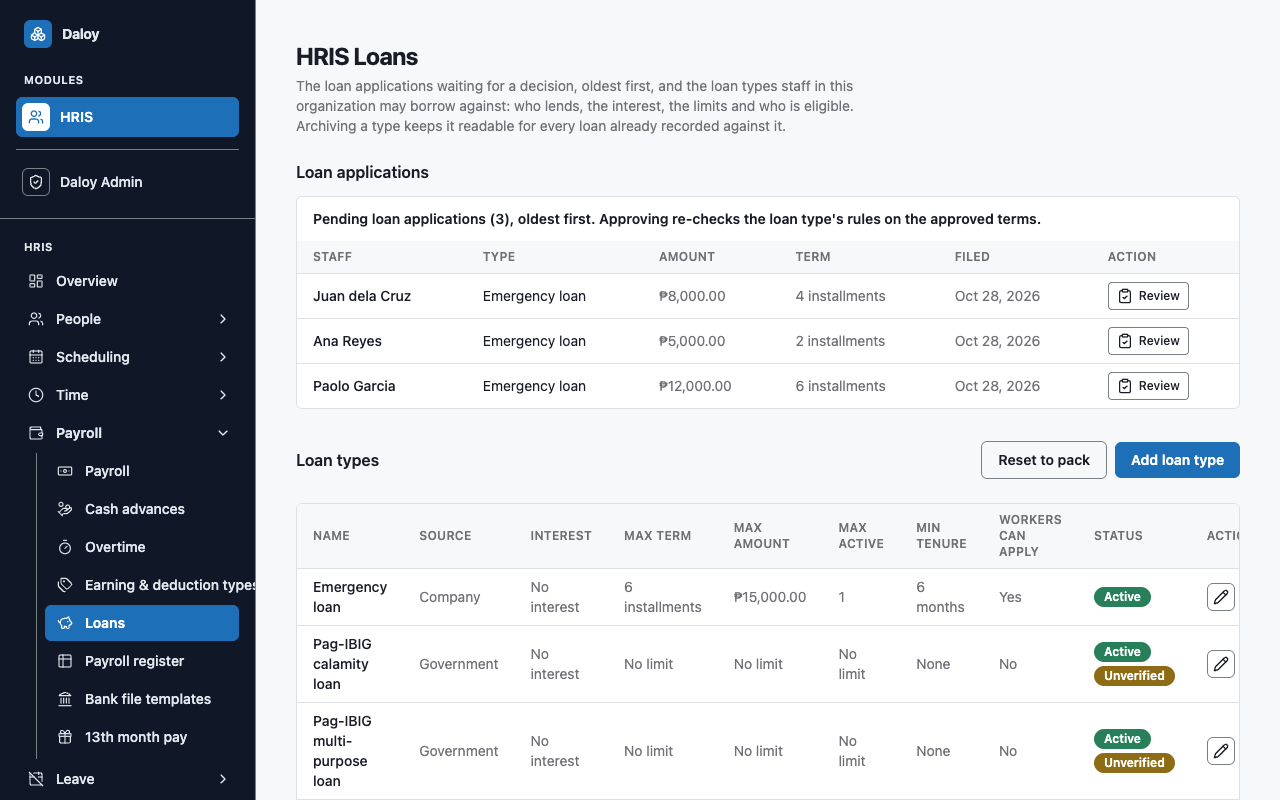
Set up loan types
- In the side menu, open Payroll › Loans.
- Click "Add loan type".
- Type a "Name" and choose the "Source": Company or Government.
- Choose the "Interest" and, if it applies, the "Interest rate (%)".
- Set the "Max term (installments)", the maximum amount, the "Max active loans per employee" and the "Minimum tenure (months)".
- Tick "Workers can apply" to let staff apply for it themselves.
- Click "Add loan type".
Approve or deny a loan application
- On the Loans screen, find the application under the pending list. The oldest is first.
- Click "Review".
- To approve, check or change the "Approve amount (₱)" and "Approve term (installments)", then click "Approve".
- To deny, type a note and click "Deny".
- An approved loan is repaid through payroll, starting with the next pay period.
Record a government loan
Use this for an SSS or Pag-IBIG loan the agency has already granted.
- On the Loans screen, click "Record a government loan".
- Choose the employee and the loan type, and type the "Loan number".
- Type the "Principal (₱)", the "Monthly amortization (₱)", the "Start month" and the number of months.
- Click "Record loan".
Skip an installment or record a payoff
- Open the loan from the Loans screen.
- Click "Defer next installment" to skip the next deduction, or "Record payoff" when the loan is paid in full.
- For a payoff, type the "Amount paid (₱)" and the "Paid on" date, then save.
- A payoff cannot be removed. Government loans cannot be deferred.
- Reports › Loans lists every loan, with filters and "Export CSV".